


Phiên bản mới nhất
Phiên bản
1.2.20
1.2.20
Cập nhật
tháng 7 14, 2025
tháng 7 14, 2025
Nhà phát triển
TAPUNIVERSE
TAPUNIVERSE
Danh mục
Design
Design
Nền tảng
Android
Android
Lượt tải
0
0
Giấy phép
Free
Free
Tên gói
com.tapuniverse.blurphoto
com.tapuniverse.blurphoto
Báo cáo
Báo lỗi
Báo lỗi
Tìm hiểu thêm về Blur Photo - Blur Background
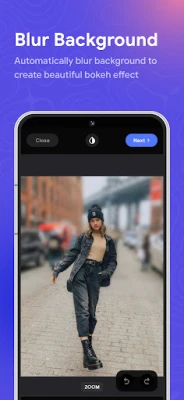
Blur Photo is the perfect censor photo app for blur background and picture blur. With advanced blur image and blur background, you can create photo mosaic, censor photo, add motion blur and even face blur.
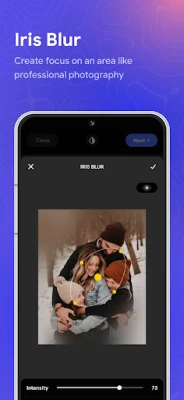
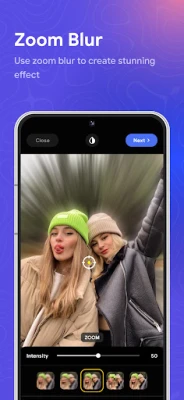
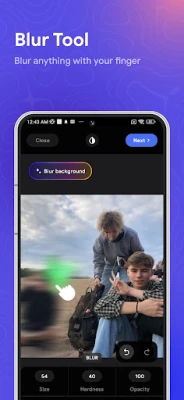
Blur Photo is a great picture blur tool to make blur image. It offers various blur effect for dramatic motion blur, photo mosaic, bokeh effect or tilt shift lens. You can blur background, face blur or censor photo with one click. Picture blur to adjust blur effect intensity with complete control over blur photo selection to select the area to picture blur or blur background.
Blur Photo also features picture blur tools for photo mosaic, tilt shift lens or face blur your photo. It provides multiple blur effect to make them eye-catching.
Powerful blur image to blur background and face blur. Save your blur photo in high-resolution and share with friends and family.
Features of Blur Photo
- Blur Background : Automatically blur background
- Blur Effect : Provide unique blur effect (motion blur, photo mosaic, bokeh effect,...)
- Face blur and censor photo with one touch
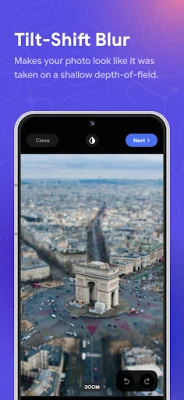
- Tilt shift lens for powerful depth-of-field editing
- Custom picture blur intensity & size
- Crop and rotate blur image
- High-resolution blur photo saving.
Blur Photo is an amazing blur background app to picture blur photos. You can also use blur image tools to censor photo or create stunning blur effect like motion blur, photo mosaic or bokeh effect. Give your censor photo a unique look. Blur Photo intuitive design makes it easy to censor photo where you want and adjust the intensity of blur effect.
Blur Photo also features picture blur tools for photo mosaic, tilt shift lens or face blur your photo. It provides multiple blur effect to make them eye-catching.
Powerful blur image to blur background and face blur. Save your blur photo in high-resolution and share with friends and family.
Features of Blur Photo
- Blur Background : Automatically blur background
- Blur Effect : Provide unique blur effect (motion blur, photo mosaic, bokeh effect,...)
- Face blur and censor photo with one touch
- Tilt shift lens for powerful depth-of-field editing
- Custom picture blur intensity & size
- Crop and rotate blur image
- High-resolution blur photo saving.
Blur Photo is an amazing blur background app to picture blur photos. You can also use blur image tools to censor photo or create stunning blur effect like motion blur, photo mosaic or bokeh effect. Give your censor photo a unique look. Blur Photo intuitive design makes it easy to censor photo where you want and adjust the intensity of blur effect.
Đánh giá ứng dụng
Thêm bình luận & đánh giá
Đánh giá người dùng
Dựa trên 0 đánh giá
Chưa có đánh giá nào.
Bình luận sẽ không được duyệt nếu là SPAM, lạm dụng, lạc đề, dùng từ ngữ thô tục, công kích cá nhân, hoặc kích động thù ghét.











Xem thêm »

Ứng dụng phổ biến

Zalopay Thanh Toán Tích ThưởngZION JOINT STOCK COMPANY

FacebookMeta Platforms, Inc.

YouTubeGoogle LLC

ZaloZalo Group

VNeIDTrung tâm dữ liệu quốc gia về dân cư

GPS định vị & theo dõi vị tríANKO Solutions LLC

Adobe Scan: Quét tài liệu, ảnhAdobe

Rakuten Viber MessengerViber Media

Duolingo: Học ngoại ngữDuolingo

MessengerMeta Platforms, Inc.
Xem thêm »
Lựa chọn của biên tập viên
Adobe Scan: Quét tài liệu, ảnhAdobe

YouTube Kids 5Google LLC
YouTubeGoogle LLC
Duolingo: Học ngoại ngữDuolingo
VNeIDTrung tâm dữ liệu quốc gia về dân cư
Zalopay Thanh Toán Tích ThưởngZION JOINT STOCK COMPANY
ZaloZalo Group
FacebookMeta Platforms, Inc.
Rakuten Viber MessengerViber Media

WhatsApp BusinessWhatsApp LLC