
Phiên bản mới nhất
Phiên bản
25.06.1
25.06.1
Cập nhật
tháng 6 22, 2025
tháng 6 22, 2025
Nhà phát triển
MYTIforge
MYTIforge
Danh mục
Design
Design
Nền tảng
Android
Android
Lượt tải
0
0
Giấy phép
Free
Free
Tên gói
fr.moblo
fr.moblo
Báo cáo
Báo lỗi
Báo lỗi
Tìm hiểu thêm về Moblo - 3D furniture modeling
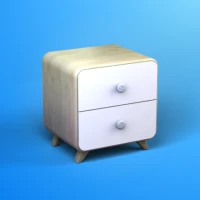
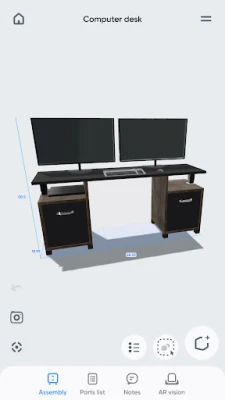
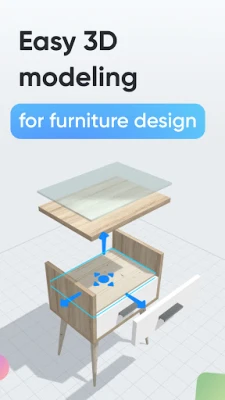
Want to create a bespoke piece of furniture or furnish a room yourself? Moblo is the perfect 3D modelling tool for your future projects. Ideal for easily drawing furniture in 3D, you can also use it to imagine more complex interior designs. The augmented reality module let you quickly bring your ideas to life and stage them at home.
Whether you're a beginner or an experienced 3D modeller, Moblo is the perfect 3D modelling software for your bespoke furniture projects. With an interface suitable for both touch and mouse, Moblo is simple and accessible to everyone.
Examples of furniture or fittings often designed with Moblo :
- Made-to-measure shelving
- Bookcase
- Dressing room
- TV unit
- Desk
- Children's bed
- Kitchen
- Bedroom
- Wooden furniture
- …
Take a tour of our website or our discord server to find out what can be made with Moblo. From DIY enthusiasts to professionals (woodworker, kitchen designer, room designer, ...) the community shares a lot of ideas and creations.
www.moblo3d.app
Creation steps :
1 - 3D modeling
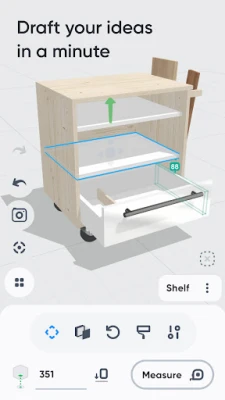
Assemble your future furniture in 3D using an intuitive interface and ready-to-use elements (primitive shapes/feet/handles)
2 - Customise colours and materials
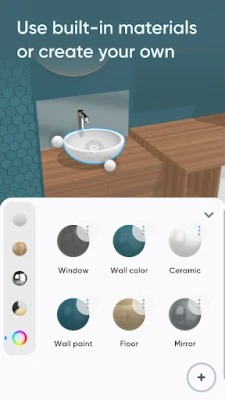
Choose the materials you want to apply to your 3D furniture from our library (paint, wood, metal, glass). Or create your own material using a simple editor.
3 - Augmented reality
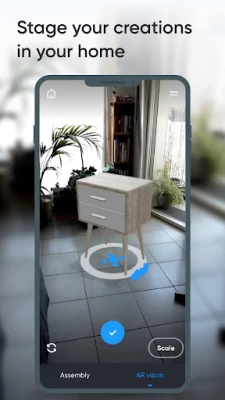
Using your phone's camera, place your future 3D furniture in your home using augmented reality and adjust your design.
4 - 3D export
Export your project as a 3D mesh file (.stl or .obj) for use with other software such as Sketchup or Blender.
Main features :
- 3D assembly (displacement/deformation/rotation)
- Duplication/masking / locking of one or more elements.
- Materials library (paint, wood, metal, glass, etc.)
- Custom materials editor (color, texture, shininess, reflection, opacity)
- Augmented reality visualisation.
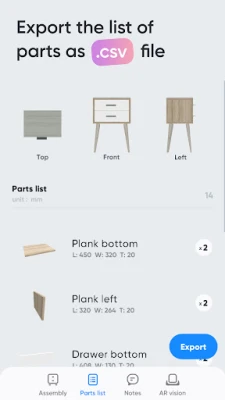
- Parts list.
- Notes related to the parts.
- Taking photos.
Premium Features :
- Possibility of having several projects in parallel.
- Unlimited parts per project.
- Access to all types of parts.
- Access to all library materials.
- Save selected parts as a new project.
- Import a project into an existing one.
- Export to 3D mesh files .stl or .obj (raw mesh without colors or textures)
- Export the parts list in .csv format (can be opened with Microsoft Excel or Google Sheets)
- Share creations with other Moblo apps.
For further information, please visit our resource page on the moblo3d.app website.
Examples of furniture or fittings often designed with Moblo :
- Made-to-measure shelving
- Bookcase
- Dressing room
- TV unit
- Desk
- Children's bed
- Kitchen
- Bedroom
- Wooden furniture
- …
Take a tour of our website or our discord server to find out what can be made with Moblo. From DIY enthusiasts to professionals (woodworker, kitchen designer, room designer, ...) the community shares a lot of ideas and creations.
www.moblo3d.app
Creation steps :
1 - 3D modeling
Assemble your future furniture in 3D using an intuitive interface and ready-to-use elements (primitive shapes/feet/handles)
2 - Customise colours and materials
Choose the materials you want to apply to your 3D furniture from our library (paint, wood, metal, glass). Or create your own material using a simple editor.
3 - Augmented reality
Using your phone's camera, place your future 3D furniture in your home using augmented reality and adjust your design.
4 - 3D export
Export your project as a 3D mesh file (.stl or .obj) for use with other software such as Sketchup or Blender.
Main features :
- 3D assembly (displacement/deformation/rotation)
- Duplication/masking / locking of one or more elements.
- Materials library (paint, wood, metal, glass, etc.)
- Custom materials editor (color, texture, shininess, reflection, opacity)
- Augmented reality visualisation.
- Parts list.
- Notes related to the parts.
- Taking photos.
Premium Features :
- Possibility of having several projects in parallel.
- Unlimited parts per project.
- Access to all types of parts.
- Access to all library materials.
- Save selected parts as a new project.
- Import a project into an existing one.
- Export to 3D mesh files .stl or .obj (raw mesh without colors or textures)
- Export the parts list in .csv format (can be opened with Microsoft Excel or Google Sheets)
- Share creations with other Moblo apps.
For further information, please visit our resource page on the moblo3d.app website.
Đánh giá ứng dụng
Thêm bình luận & đánh giá
Đánh giá người dùng
Dựa trên 0 đánh giá
Chưa có đánh giá nào.
Bình luận sẽ không được duyệt nếu là SPAM, lạm dụng, lạc đề, dùng từ ngữ thô tục, công kích cá nhân, hoặc kích động thù ghét.











Xem thêm »

Ứng dụng phổ biến

Zalopay Thanh Toán Tích ThưởngZION JOINT STOCK COMPANY

FacebookMeta Platforms, Inc.

YouTubeGoogle LLC

VNeIDTrung tâm dữ liệu quốc gia về dân cư

ZaloZalo Group

GPS định vị & theo dõi vị tríANKO Solutions LLC

Adobe Scan: Quét tài liệu, ảnhAdobe

Rakuten Viber MessengerViber Media

Duolingo: Học ngoại ngữDuolingo

MessengerMeta Platforms, Inc.
Xem thêm »
Lựa chọn của biên tập viên
Adobe Scan: Quét tài liệu, ảnhAdobe

YouTube Kids 5Google LLC
YouTubeGoogle LLC
Duolingo: Học ngoại ngữDuolingo
VNeIDTrung tâm dữ liệu quốc gia về dân cư
Zalopay Thanh Toán Tích ThưởngZION JOINT STOCK COMPANY
ZaloZalo Group
FacebookMeta Platforms, Inc.
Rakuten Viber MessengerViber Media

WhatsApp BusinessWhatsApp LLC