

Phiên bản mới nhất
Phiên bản
3.1.0
3.1.0
Cập nhật
tháng 7 03, 2025
tháng 7 03, 2025
Nhà phát triển
U.S. Customs and Border Protection
U.S. Customs and Border Protection
Danh mục
Travel & Local
Travel & Local
Nền tảng
Android
Android
Lượt tải
0
0
Giấy phép
Free
Free
Tên gói
gov.dhs.cbp.pspd.mpc
gov.dhs.cbp.pspd.mpc
Báo cáo
Báo lỗi
Báo lỗi
Tìm hiểu thêm về Mobile Passport Control
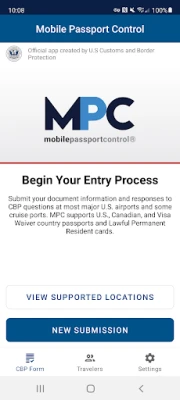
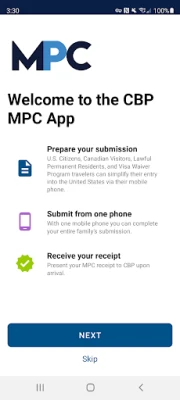
Mobile Passport Control (MPC) is an official application created by U.S. Customs and Border Protection that streamlines your CBP inspection process at select U.S. entry locations. Simply complete your travel information, answer CBP inspection questions, capture a photo of yourself and of each member of your group, and follow the instructions provided on your receipt.
Important Notes:
- MPC does not replace your passport; your passport will still be required for travel.
- MPC is only available at supported CBP entry locations.
- MPC is a voluntary program which can be used by U.S. Citizens, certain Canadian Citizen Visitors, Lawful Permanent Residents, and returning Visa Waiver Program applicants with an approved ESTA.
More information regarding eligibility and supported CBP entry locations can be found on our website: https://www.cbp.gov/travel/us-citizens/mobile-passport-control
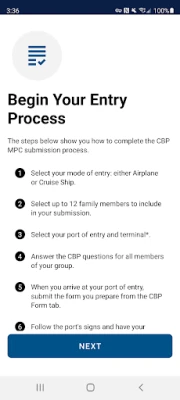
MPC can be used in 6 simple steps:
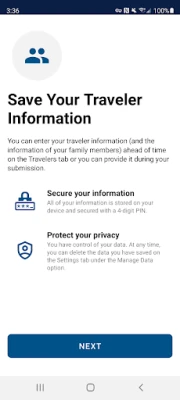
1. Create a primary profile to save your travel documents and biographic information. You can add and save additional eligible people to the MPC app so that you can submit together from one device. Your information will be securely stored on your device to be used for future travel.
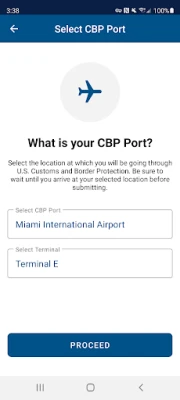
2. Select your CBP port of entry, terminal (if applicable), and add up to 11 additional members of your group to include in your submission.
3. Answer CBP inspection questions and certify the truthfulness and accuracy of your answers.
4. Upon arriving at your selected port of entry, tap the “Yes, Submit Now” button. You will be asked to capture a clear and unobstructed photo of yourself and of each other person that you included in your submission.
5. Once your submission is processed, CBP will send a virtual receipt back to your device. Follow the instructions on your receipt and be prepared to present your passport and other relevant travel documents.
6. The CBP Officer will complete the inspection. If further information is required, the CBP Officer will let you know. Please note: The CBP Officer may ask to capture an additional photo of you or your group members for verification.
- MPC does not replace your passport; your passport will still be required for travel.
- MPC is only available at supported CBP entry locations.
- MPC is a voluntary program which can be used by U.S. Citizens, certain Canadian Citizen Visitors, Lawful Permanent Residents, and returning Visa Waiver Program applicants with an approved ESTA.
More information regarding eligibility and supported CBP entry locations can be found on our website: https://www.cbp.gov/travel/us-citizens/mobile-passport-control
MPC can be used in 6 simple steps:
1. Create a primary profile to save your travel documents and biographic information. You can add and save additional eligible people to the MPC app so that you can submit together from one device. Your information will be securely stored on your device to be used for future travel.
2. Select your CBP port of entry, terminal (if applicable), and add up to 11 additional members of your group to include in your submission.
3. Answer CBP inspection questions and certify the truthfulness and accuracy of your answers.
4. Upon arriving at your selected port of entry, tap the “Yes, Submit Now” button. You will be asked to capture a clear and unobstructed photo of yourself and of each other person that you included in your submission.
5. Once your submission is processed, CBP will send a virtual receipt back to your device. Follow the instructions on your receipt and be prepared to present your passport and other relevant travel documents.
6. The CBP Officer will complete the inspection. If further information is required, the CBP Officer will let you know. Please note: The CBP Officer may ask to capture an additional photo of you or your group members for verification.
Đánh giá ứng dụng
Thêm bình luận & đánh giá
Đánh giá người dùng
Dựa trên 0 đánh giá
Chưa có đánh giá nào.
Bình luận sẽ không được duyệt nếu là SPAM, lạm dụng, lạc đề, dùng từ ngữ thô tục, công kích cá nhân, hoặc kích động thù ghét.





Xem thêm »

Ứng dụng phổ biến

Zalopay Thanh Toán Tích ThưởngZION JOINT STOCK COMPANY

FacebookMeta Platforms, Inc.

YouTubeGoogle LLC

Adobe Scan: Quét tài liệu, ảnhAdobe

ZaloZalo Group

Rakuten Viber MessengerViber Media

VNeIDTrung tâm dữ liệu quốc gia về dân cư

Duolingo: Học ngoại ngữDuolingo

MessengerMeta Platforms, Inc.

GPS định vị & theo dõi vị tríANKO Solutions LLC
Xem thêm »
Lựa chọn của biên tập viên
Adobe Scan: Quét tài liệu, ảnhAdobe

YouTube Kids 5Google LLC
YouTubeGoogle LLC
Duolingo: Học ngoại ngữDuolingo
VNeIDTrung tâm dữ liệu quốc gia về dân cư
Zalopay Thanh Toán Tích ThưởngZION JOINT STOCK COMPANY
ZaloZalo Group
FacebookMeta Platforms, Inc.
Rakuten Viber MessengerViber Media

WhatsApp BusinessWhatsApp LLC