

Phiên bản mới nhất
Phiên bản
2.0.8
2.0.8
Cập nhật
tháng 12 31, 2025
tháng 12 31, 2025
Nhà phát triển
ATNSOFT
ATNSOFT
Danh mục
Finance
Finance
Nền tảng
Android
Android
Lượt tải
0
0
Giấy phép
Free
Free
Tên gói
com.atnsoft.calculator
com.atnsoft.calculator
Báo cáo
Báo lỗi
Báo lỗi
Tìm hiểu thêm về Voice Calculator Pro
🎁 The Pro version of the calculator is now free!
ATNSOFT Calculator lets you:
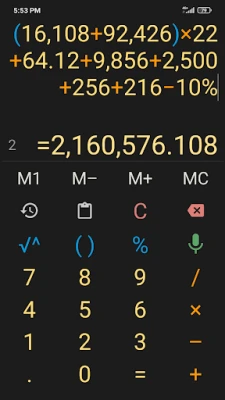
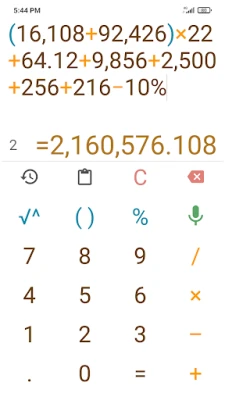
✓ Instantly enter numbers and mathematical expressions using an ergonomic on-screen keyboard and voice input (currently supports English, Arabic, Bengali, Chinese, Croatian, Czech, Dutch, French, German, Greek, Hindi, Hungarian, Indonesian, Italian, Japanese, Korean, Malayalam, Polish, Portuguese, Romanian, Russian, Spanish, Swedish, Tamil, Thai, Turkish and Vietnamese). Just press the mic button and speak the expression (for example, 74 point 5 times 4 plus 37 = 74.5 × 4 + 37 = 335): it will appear on screen and the result will be calculated immediately!
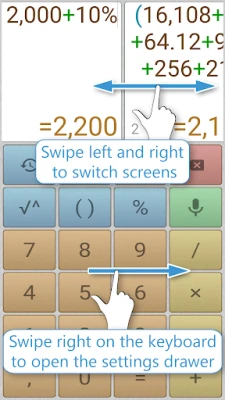
✓ Make two or more calculations simultaneously. To do this, you can switch editing screens with a horizontal swipe along the top edge. You can give names to screens by tapping the screen number.
✓ Quickly copy the result to the clipboard simply by tapping it. There is a special button for pasting from the clipboard (📋).
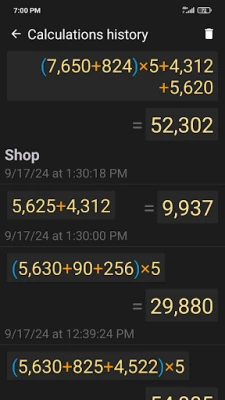
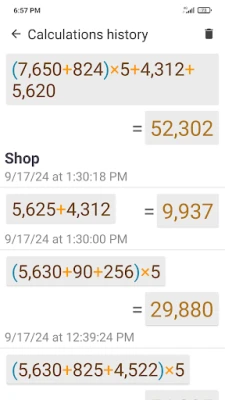
✓ All calculations are recorded in the calculations history, from where you can insert the expression and result into the editor. These records can be instantly deleted with a horizontal swipe. Any record from the history can be tagged with text by tapping the date or time.
✓ Execute mathematical operations with incredibly large numbers and expressions.
✓ Raise to the n-th power or extract the root of the n-th power (for example: 5 cubed = 5^3 = 125; the cube root of 27 = 3√27 = 3).
✓ Percentage calculations (for example: 200 + 10% = 220; 10 % 200 = 20).
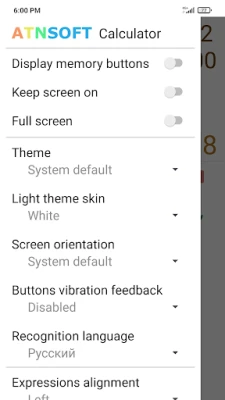
✓ Convenient, user-friendly settings that can be easily opened with a swipe right on the keyboard. The settings include: vibrate on click, full-screen mode, keep screen on, and other options.
✓ The result is always displayed naturally, without incomprehensible E's, dashes, and numbers.
✓ Easily work with many memory cells, and easily switch between them. You can set a name for each cell, letting you intuitively use the memory for a specific field of activity.
✓ Quickly switch themes.
✓ Instantly enter numbers and mathematical expressions using an ergonomic on-screen keyboard and voice input (currently supports English, Arabic, Bengali, Chinese, Croatian, Czech, Dutch, French, German, Greek, Hindi, Hungarian, Indonesian, Italian, Japanese, Korean, Malayalam, Polish, Portuguese, Romanian, Russian, Spanish, Swedish, Tamil, Thai, Turkish and Vietnamese). Just press the mic button and speak the expression (for example, 74 point 5 times 4 plus 37 = 74.5 × 4 + 37 = 335): it will appear on screen and the result will be calculated immediately!
✓ Make two or more calculations simultaneously. To do this, you can switch editing screens with a horizontal swipe along the top edge. You can give names to screens by tapping the screen number.
✓ Quickly copy the result to the clipboard simply by tapping it. There is a special button for pasting from the clipboard (📋).
✓ All calculations are recorded in the calculations history, from where you can insert the expression and result into the editor. These records can be instantly deleted with a horizontal swipe. Any record from the history can be tagged with text by tapping the date or time.
✓ Execute mathematical operations with incredibly large numbers and expressions.
✓ Raise to the n-th power or extract the root of the n-th power (for example: 5 cubed = 5^3 = 125; the cube root of 27 = 3√27 = 3).
✓ Percentage calculations (for example: 200 + 10% = 220; 10 % 200 = 20).
✓ Convenient, user-friendly settings that can be easily opened with a swipe right on the keyboard. The settings include: vibrate on click, full-screen mode, keep screen on, and other options.
✓ The result is always displayed naturally, without incomprehensible E's, dashes, and numbers.
✓ Easily work with many memory cells, and easily switch between them. You can set a name for each cell, letting you intuitively use the memory for a specific field of activity.
✓ Quickly switch themes.
Đánh giá ứng dụng
Thêm bình luận & đánh giá
Đánh giá người dùng
Dựa trên 0 đánh giá
Chưa có đánh giá nào.
Bình luận sẽ không được duyệt nếu là SPAM, lạm dụng, lạc đề, dùng từ ngữ thô tục, công kích cá nhân, hoặc kích động thù ghét.









Xem thêm »

Ứng dụng phổ biến

FacebookMeta Platforms, Inc.

Zalopay Thanh Toán Tích ThưởngZION JOINT STOCK COMPANY

YouTubeGoogle LLC

Adobe Scan: Quét tài liệu, ảnhAdobe

ZaloZalo Group

Rakuten Viber MessengerViber Media

VNeIDTrung tâm dữ liệu quốc gia về dân cư

Duolingo: Học ngoại ngữDuolingo

MessengerMeta Platforms, Inc.

GPS định vị & theo dõi vị tríANKO Solutions LLC
Xem thêm »
Lựa chọn của biên tập viên
Adobe Scan: Quét tài liệu, ảnhAdobe

YouTube Kids 5Google LLC
YouTubeGoogle LLC
Duolingo: Học ngoại ngữDuolingo
VNeIDTrung tâm dữ liệu quốc gia về dân cư
Zalopay Thanh Toán Tích ThưởngZION JOINT STOCK COMPANY
ZaloZalo Group
FacebookMeta Platforms, Inc.
Rakuten Viber MessengerViber Media

WhatsApp BusinessWhatsApp LLC